MT5 Expert Advisor Suite ยท NewOnes, Ltd

Trading robots built
like risk managers.

Two battle-tested MetaTrader 5 Expert Advisors โ€” a patient mean-reversion system and an aggressive breakout scalper. Every trade carries a hard stop loss, position sizes scale with volatility, and a live dashboard keeps your drawdown in front of you. No martingale. No grid. Ever.

๐Ÿ“ฑ MTN & Airtel Money (UG) ๐Ÿ“ฑ M-Pesa (KE) โ‚ฟ USDT / USDC ยท 6 networks ๐Ÿงช Free on demo & strategy tester
The Collection

Pick your trading style โ€” or run both

Each EA is an independent system with its own edge. They complement each other: one fades exhaustion, the other rides momentum.

Mean Reversion

The Sprinter

Fades over-extended moves with double confirmation, then manages the reversion tick by tick.

  • Entries only when price breaks the Bollinger Band and RSI reaches an extreme
  • Optional higher-timeframe Bollinger confluence filter
  • ATR-scaled stops, order distance and trailing โ€” adapts to any symbol
  • Spike filter pauses trading on abnormal ticks; spread guard on entry
  • Session-hours control with automatic order cleanup
  • On-chart dashboard: balance, equity, 24h / 7d / 30d drawdown & trades
$599one-time ยท per live account
Breakout Scalper

SpeedScalper

Hunts clean swing highs and lows, then strikes the breakout with pending stop orders.

  • Automatic swing high/low detection with pending stop-order entries
  • Four tuned profiles: Forex ยท Bitcoin ยท Gold ยท Indices
  • Built-in economic-calendar news filter โ€” steps aside before releases
  • RSI-extreme and moving-average distance filters
  • Risk-percent position sizing, trailing stop, order expiration
  • On-chart dashboard: balance, equity, 24h / 7d / 30d drawdown & trades
$599one-time ยท per live account

Every license is lifetime, includes all future updates, and activates one live MT5 account. Demo accounts and the strategy tester are always free โ€” test as long as you like before buying.

Verified & Independent

Live performance, tracked on Myfxbook

We publish our live accounts on Myfxbook with read-only investor access โ€” verified track records with real spreads and real slippage. Judge the robots by their live numbers, not by marketing claims.

Open the Myfxbook track record โ†—

Past performance does not guarantee future results.

Under the Hood

Backtests & the live dashboard

MT5 Strategy Tester results on real-tick data, modelling spread and commission. Run your own โ€” both EAs are fully functional in the tester, free.

๐Ÿ” Click any screenshot to enlarge โ€” click again to inspect at full resolution.

MT5 Strategy Tester report: profit factor 1.82, Sharpe 25.56, 4357 trades, 100% history quality

The Sprinter โ€” Strategy Tester report (EURUSD M5, every tick)

Backtest balance and equity curve climbing steadily with shallow drawdowns

Balance / equity curve from the same test

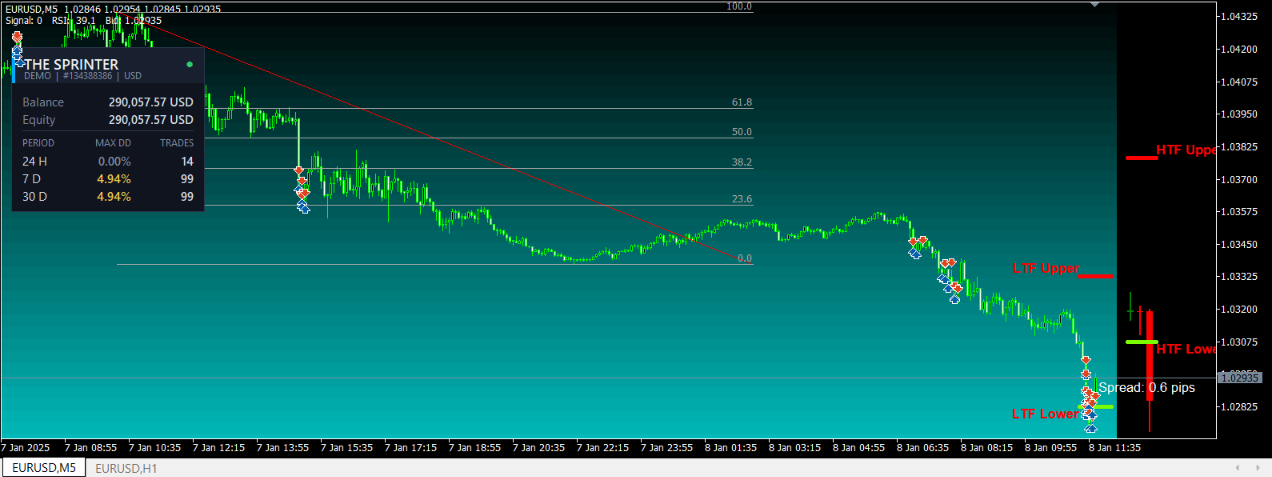
The Sprinter EA running on a EURUSD M5 chart with its live account dashboard panel

Live on chart โ€” the account dashboard both EAs ship with

Getting Started

Live in three steps

1

Download & test free

Grab either EA above and run it on a demo account or in the strategy tester โ€” no license, no signup, no time limit.

2

Buy when convinced

Create an account and pay by MTN/Airtel Mobile Money, M-Pesa, or USDT/USDC. Keys are issued the moment payment confirms.

3

Activate on live

Paste the key into the EA on your live account โ€” it locks to that account automatically and you're in business.

๐Ÿ“ฆ How to install the EA in MetaTrader 5

1. In MT5, open File โ†’ Open Data Folder and copy the downloaded .ex5 file into MQL5\Experts.
2. Open Tools โ†’ Options โ†’ Expert Advisors, tick Allow WebRequest for listed URL and add https://profitbots.site (only needed for live trading โ€” demo and tester work without it).
3. Restart MT5 (or right-click Expert Advisors in the Navigator โ†’ Refresh), then drag the EA onto a chart and enable Algo Trading.
4. To backtest: open the Strategy Tester (Ctrl+R), pick the EA, a symbol and "Every tick based on real ticks", and press Start.

Traders on ProfitBots

What our users say

"[Placeholder โ€” replace with a real customer quote.]"

โ€” Customer name, Country

"[Placeholder โ€” replace with a real customer quote.]"

โ€” Customer name, Country

"[Placeholder โ€” replace with a real customer quote.]"

โ€” Customer name, Country

Questions

Frequently asked questions

Do I need a license to try the EAs?

No. Both EAs run completely free on demo accounts and in the MT5 Strategy Tester. A license is only required to trade on a live account.

How does activation work?

Attach the EA to a chart on your live MT5 account and paste your key into the License Key input. The key locks to that account number automatically on first use. You'll also need to allow WebRequest for our license server URL under Tools โ†’ Options โ†’ Expert Advisors (the EA prints the exact URL if it's missing).

Does one key work for both EAs?

No โ€” keys are per-EA. A Sprinter key activates The Sprinter; a SpeedScalper key activates SpeedScalper. Your dashboard shows which EA each key belongs to.

Can I use one license on two accounts?

No โ€” one license serves exactly one live account. If you trade several accounts, buy one license per account from your dashboard. You can own as many licenses as you need, across both EAs.

I changed brokers / account numbers. Can I move my license?

Yes. Contact support from your account email and we'll release the key so it can bind to your new account.

Which payment methods do you accept?

MTN and Airtel Mobile Money in Uganda, M-Pesa in Kenya, and stablecoins everywhere else โ€” USDT (ERC-20, Polygon/USDT0, TRC-20) and USDC (ERC-20, Polygon, Base). Keys are issued automatically the moment payment confirms.

What happens if your license server is down?

Nothing dramatic. The EAs keep trading for 72 hours from their last successful check, and they never abandon managing your open positions.

Which pairs and timeframes do the EAs work on?

The Sprinter is designed for liquid FX majors and metals on M5โ€“M30. SpeedScalper ships with dedicated profiles for Forex, Bitcoin, Gold and Indices. Always validate settings in the strategy tester first โ€” it's free.

Is trading with these EAs risk-free?

No. All trading involves substantial risk of loss. Both EAs enforce stop losses and volatility-based sizing, but no robot can guarantee profits. Never trade money you cannot afford to lose.


Stay in the Loop

Join the community

Setup guides, recommended settings, performance updates and release notes are posted to our channels first.